01
Stem Playback
$250
- Stems organized and color-coded
- Click, count-ins, spoken cues
- Markers, setlist, transitions
- Up to 10 songs
Ableton · Resolume · DMX · MIDI · OSC · Stream Deck
Patch Notes builds automated live shows, from stem playback to full production. Tracks, video, lights and gear run as one system from the Ableton timeline and a Stream Deck, hitting every cue the same way, every night. Built for worship teams, bands, artists and production companies.
Stream Deck
Buttons for the operator or band
Ableton Live
Tracks, click, cues — the master clock
Resolume
Video on the downbeat
Lights
DMX looks and chases
Gear
Patches, FX, mixer scenes
Five levels, from a simple playback rig to a full production. Each level includes everything before it, and every build comes with an operator guide and a handoff call.
01
$250
02
$350
03 · Most popular
$550
04
$950+
05
From $2,000
Also available: monthly support ($150/month), remote training ($60/hour), extra songs and 48-hour rush delivery. AV and production companies: ask about subcontract rates.
The same session that plays your tracks can run your lights, video and gear, with a control surface anyone on the team can use.



Here's what happens when the operator presses Play on a Patch Notes rig. Everything follows the Ableton timeline, so it lands the same way every night.
01Stems, click and spoken cues roll from Ableton Live, in time and in the right order.
02Resolume follows the song, so clips change on the beat without anyone touching a laptop.
03Each song and section gets its own DMX look, triggered from the same timeline.
04A safe key stops playback cleanly if anything goes wrong, so the band is never stuck.
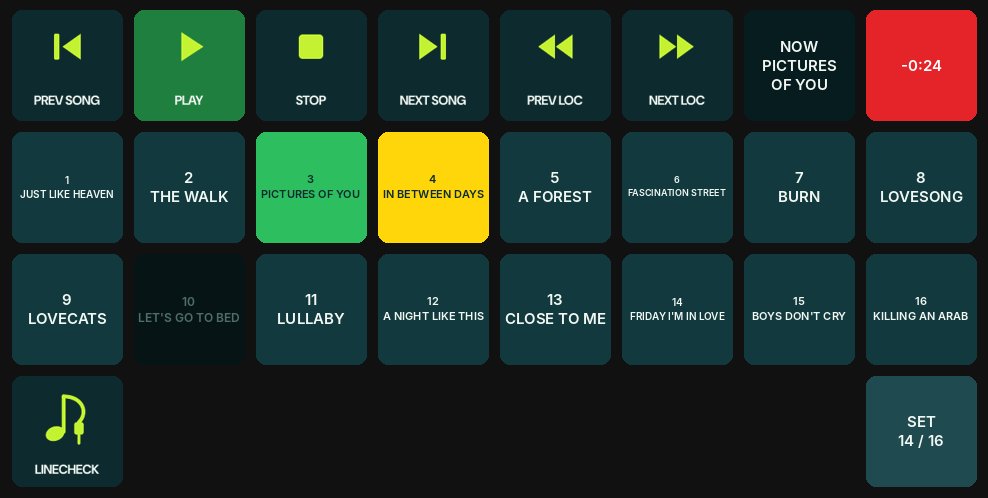
Recent build
Stem playback in Ableton Live, controlled from a two-page Stream Deck XL layout built in Bitfocus Companion.
01
Tell me about your show
A short intake form: setlist, rig, and what you want automated.
02
Get a fixed quote
A clear proposal within 24 hours, with a system drawing for larger shows.
03
I build and test
Every song, cue, button, video hit and light change run top to bottom.
04
You hit play
Show files, operator guide, button map and a walkthrough call.
Hear and test the work on your own rig before you book the full show.
First-time clients get one song built free: playback, cues and buttons. Run it at rehearsal, then decide.
Send your setlist and gear list. You get one clear price, so there are no hourly surprises.
Every song, cue and button is run start to finish before handoff. You get an operator guide, a button map and a walkthrough call.
Stems or multitracks (WAV, 48 kHz preferred), your setlist and a list of your gear. For video, your clips and screen layout; for lights, your fixture list.
Yes. Worship teams are a core focus: Ableton playback sessions with click and spoken cues, a simple Stream Deck layout that volunteers can run, and monthly support plans.
It's the easiest way to run the show, but not required. The same layout can run on an iPad, a touchscreen or a MIDI foot controller.
Either a USB-DMX or Art-Net/sACN interface for your fixtures, or a lighting console that accepts MIDI, OSC or timecode. I'll recommend the simplest option for your rig.
Tell me what you run and I'll build for it. Some automation needs Live Suite or Max for Live — I'll flag that in your quote.
Both. Most builds happen remotely through a shared folder and screen share. Full productions can include on-site rehearsal support around [City].
Send your setlist and gear list, and I'll reply with a fixed quote within 24 hours. First-time clients can try one song free.